

Introduction
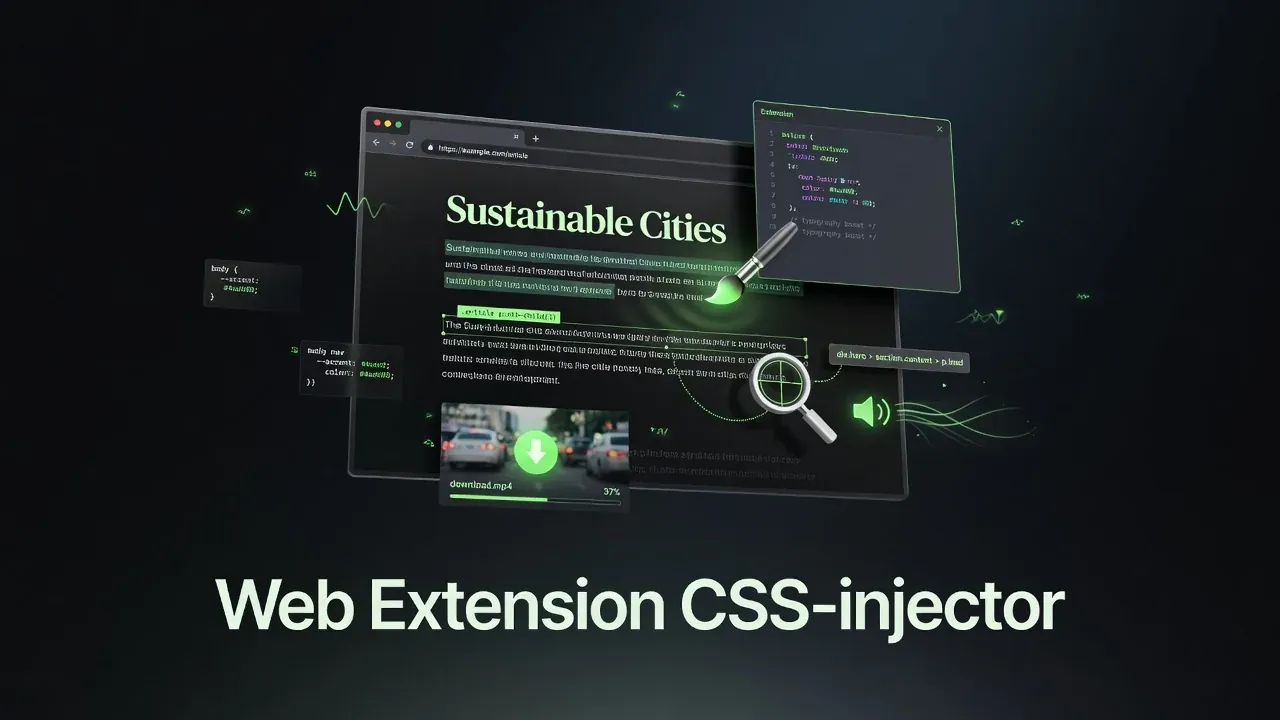
Pageside is a lightweight, privacy-respecting browser extension that gives you practical tools to customize websites, inspect elements, listen to text, and save media — all running entirely in your browser with no servers, accounts, or telemetry.
The repository is named web_extension on GitHub,[1] but the extension itself ships under the name Pageside. It is a fully functional Manifest V3[2] extension focused on real daily-use features rather than flashy marketing — and it requires no build step to develop or install. The current release is v2.0.5.[6]
The whole UI is a stack of collapsible sections — Style, Notes, Password, Tools, and Tabs — tuned for both a desktop popup and a phone-sized panel (large tap targets, safe-area padding, no horizontal overflow).
Key Features
- Per-Domain CSS Injection — Write and save custom CSS snippets that apply automatically on every subsequent visit to a specific domain. Perfect for removing annoying banners, adjusting font sizes, or permanently tweaking a site’s layout.
- Element Inspector — Click Select Container, then hover (or drag on touch) over any element to copy its CSS selector to the clipboard, without opening DevTools. Ideal for debugging styles or targeting elements for your custom CSS rules.
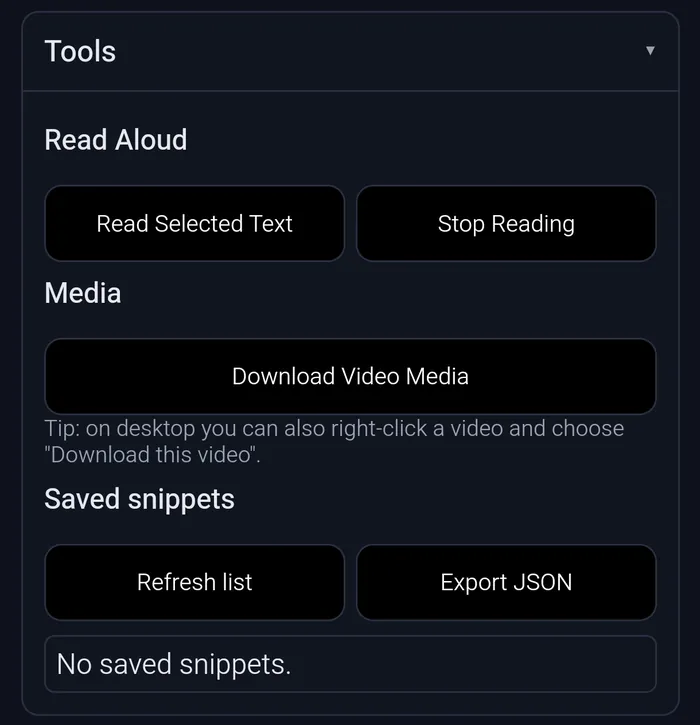
- Text-to-Speech (TTS) — Select any text and have it read aloud using the browser’s built-in Web Speech API.[3] Supports multiple languages and accents depending on the voices installed in your OS.
- Video & Media Downloader — Right-click any video element or use the popup to detect and extract video source URLs. The scanner walks
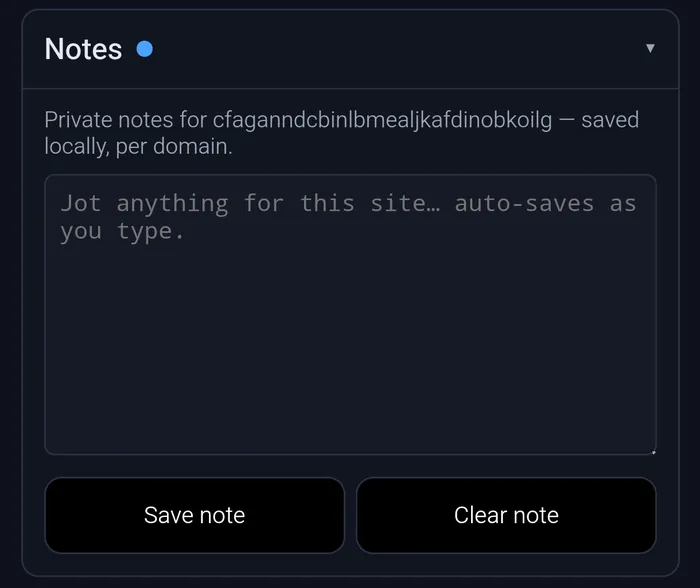
video.currentSrc,<source>tags, media-typed<a href>links, network resource entries, and (on YouTube)ytInitialPlayerResponse, then ranks the results and downloads throughchrome.downloads. - Per-Domain Notes — A private, free-form notepad bound to the current site’s base domain. It auto-saves as you type and reloads the right note when you switch domains — handy for jotting credentials hints, to-dos, or context for a site.
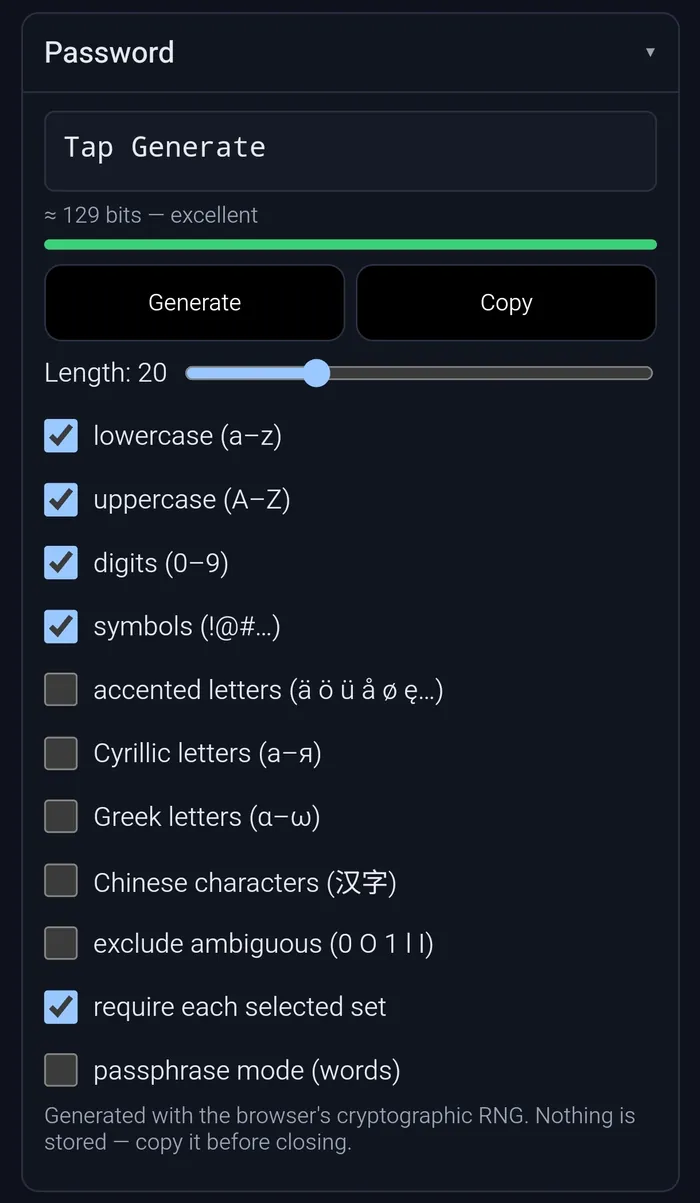
- Password & Passphrase Generator — Build strong secrets with the browser’s cryptographic RNG (
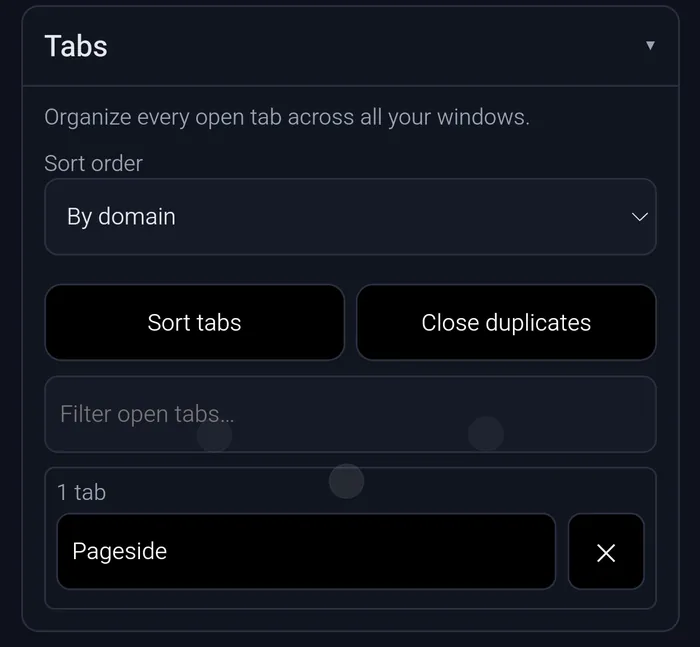
crypto.getRandomValues, neverMath.random). Length slider, character-set toggles (including accented, Cyrillic, Greek, and CJK letters), “exclude ambiguous”, “require each selected set”, a hyphenated-word passphrase mode, and a live entropy meter. Nothing generated is ever stored. - Tab Organizer — Sort every open tab across all windows by domain, title, or URL; group same-domain tabs into native tab groups (Chrome/Edge desktop); close duplicate tabs; and filter the live list to jump to any tab.
- Local-First Storage — All CSS snippets and preferences are saved in
chrome.storage.local.[4] Export and import your full configuration as JSON at any time (private notes are deliberately excluded from exports). - Context Menu Integration — Right-click context menus for one-click video downloads, powered by the background service worker.
- Cross-Browser UI — Popup interface on Chromium-based browsers; sidebar mode on Firefox and Opera.
Everything runs client-side. No data ever leaves your browser.
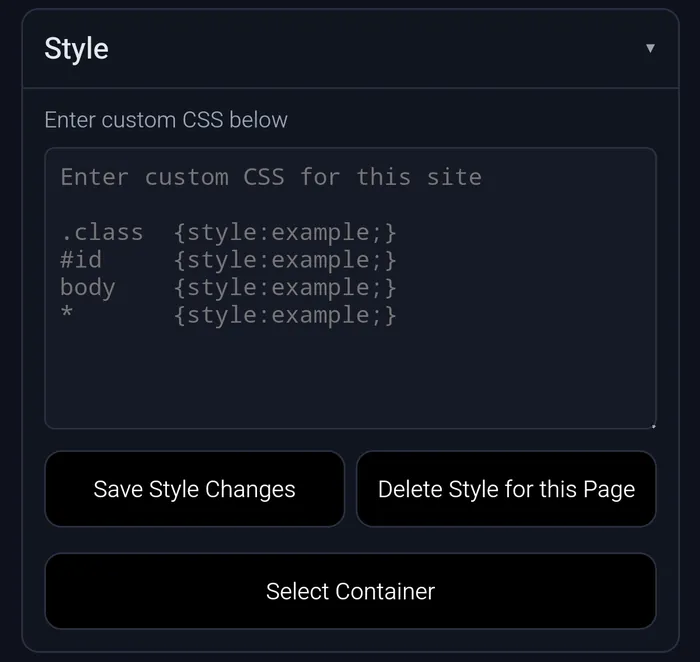
Not sure what to type into that box? Here are some of the most common one-liners. Use Select Container to grab the exact .class or #id you want to target, then drop it into one of these patterns (add !important if the site’s own styles win):
| Goal | Snippet |
|---|---|
| Hide an element (banner, popup, sidebar) | .cookie-banner { display: none; } |
| Hide by id | #newsletter-modal { display: none; } |
| Hide everything an element contains but keep its space | .ad-slot { visibility: hidden; } |
| Bump the base font size for readability | body { font-size: 18px; } |
| Widen a cramped reading column | .article { max-width: 100%; } |
| Re-enable scrolling a modal locked | html, body { overflow: auto !important; } |
| Un-stick a sticky/fixed header | .site-header { position: static !important; } |
| Force a calmer background + text colour | body { background: #0f121c; color: #e6e8ef; } |
| Recolour all links | a { color: #4aa3ff; } |
| Hide images (data-saver / declutter) | img { display: none; } |
| Kill an overlay dimmer | .overlay, .backdrop { display: none !important; } |
| Apply to the whole page | * { animation: none !important; } |
How It Works
Pageside’s four key files map cleanly to four jobs:
| File | Role |
|---|---|
manifest.json |
Declares MV3 configuration: permissions, content scripts, service worker, action popup, and sidebar panel |
content.js |
Injected into every page at document_start; handles CSS injection and the element-inspector overlay |
background.js |
Service worker; registers context menus and relays download requests |
popup.html / popup.js |
The main UI orchestrator: CSS editor, element picker, TTS controls, media scanner, and saved-snippet list |
popup-notepad.js |
The per-domain Notes module (auto-save, backed by the reserved __ps_notes storage key) |
popup-password.js |
The cryptographic password / passphrase generator (stores nothing) |
popup-tabs.js |
The Tabs organizer — sort, group-by-domain, de-duplicate, and list tabs across windows |
When you type CSS into the popup editor and click Save, the snippet is stored under the current domain key in chrome.storage.local. The content script’s storage.onChanged listener picks up the change and immediately applies the new styles via a dynamically injected <style> element — no page reload required.
The element inspector activates a hover overlay in content.js that highlights elements and computes the shortest unique CSS selector as you move your cursor. Clicking copies the selector and dismisses the overlay.
TTS passes the selected text to window.speechSynthesis.speak() in the popup context, using the browser’s native voices — no audio data ever transits a server.[3]
The media downloader scans each frame for video.currentSrc, <source> tags, media-typed <a href> links, and network resource entries, then surfaces those URLs in the popup list ranked by how likely each is to be a real downloadable file. The YouTube path uses a separate extraction strategy (ytInitialPlayerResponse) due to the platform’s multi-quality stream URLs. Blob streams are shown disabled — they cannot be fetched directly.
Architecture Deep-Dive
Manifest V3 constraints shape the design deliberately. MV3 replaces persistent background pages with an event-driven service worker,[2] which means Pageside’s background.js wakes up only on context-menu clicks and goes dormant otherwise — a deliberate memory-saving trade-off.
Storage uses chrome.storage.local rather than localStorage because storage is accessible from both the content script and the popup via the same async API, without message passing. The data model is a flat key-value map where the key is the page’s base domain — the last two labels of the hostname, so www.foo.example.com resolves to example.com — and the value is the saved CSS string. Non-CSS state (the per-domain notepad, fallback host detection) is namespaced under a reserved __ps_ prefix so it can never collide with a bare-domain CSS key, and those keys are excluded from the JSON export.
Content script injection is declared in manifest.json to run at document_start so saved styles land before the page paints (no flash of unstyled content). The script is kept side-effect-free until a saved snippet is found, then injects them into a dedicated <style> element with a deliberately neutral, randomized id so they can be cleanly removed or updated without touching the page’s own styles — and so anti-extension detection scripts can’t fingerprint Pageside by a predictable marker.
No build step is intentional and a feature: the extension loads as raw HTML/CSS/JS from the domain-css-injector-v2/ folder. This keeps the barrier to contribution as low as possible and avoids introducing a bundler dependency for what is fundamentally a small codebase.
Browser & Platform Support
| Browser | Minimum Version | Notes |
|---|---|---|
| Chrome | 116+ | Primary target; popup UI |
| Edge | 116+ | Same as Chrome |
| Opera | 102+ | Sidebar mode available |
| Firefox | 121+ | Sidebar mode; uses browser.* API shim |
| Kiwi Browser (Android) | Any extension-capable build | Install via .zip package |
| Yandex Browser (Android) | Extension-capable build | Same as Kiwi |
| Mises Browser (Android) | Extension-capable build | Same as Kiwi |
| Firefox Nightly (Android) | geckoview-based | Via Firefox Android Add-ons |
The extension targets Chromium 116+ because that is when MV3 reached full stability for offscreen documents and context-menu APIs used by the downloader.[2]
Getting Started
Download: every tagged release on the Releases page attaches two packaged zips:[6]
pageside-2.0.5.zip— the Manifest V3 build for desktop Chrome / Edge / Opera / Firefox.pageside-2.0.5-kiwi.zip— the Manifest V2 build for Kiwi and other Android Chromium forks (their experimental MV3 support silently rejects the standard zip). Both contain the same features — only the manifest differs.
Or just clone the repo and load the folder unpacked — no build step either way.
Desktop (Chrome / Edge / Opera):
- Download
pageside-2.0.5.zip(above) and unzip it, or clone the repo:git clone https://github.com/Ranzlappen/web_extension - Open
chrome://extensions(oredge://extensions/opera://extensions). - Enable Developer mode (top-right toggle).
- Click Load unpacked and select the unzipped folder (or the
domain-css-injector-v2/folder from a clone). - Pin the Pageside icon to your toolbar.
Firefox:
- Open
about:debugging#/runtime/this-firefox. - Click Load Temporary Add-on and select
manifest.jsoninsidedomain-css-injector-v2/. - For permanent installation, pack the directory as a
.zipand submit to addons.mozilla.org.
Android (Kiwi Browser recommended):
- Download
pageside-2.0.5-kiwi.zip(the Manifest V2 build) to your phone. Kiwi silently fails to load the MV3 zip, so the-kiwi.zipis the one to use. - In Kiwi, open
kiwi://extensions, enable Developer mode (top-right), tap + (from .zip/.crx/.user.js), and pick the downloaded zip. - The popup appears under the ⋮ menu (and can be pinned to the toolbar).
Full installation details are in the repository README.
Privacy & Security
Pageside was designed privacy-first from the ground up:
- No remote endpoints — the extension makes zero outbound network requests of its own.
- No analytics or crash reporting — nothing phones home.
chrome.storage.localonly — your CSS snippets are stored locally, not synced tochrome.storage.sync(which would send them to Google’s servers).- No account required — there is no sign-in, no cloud backend, nothing to breach.
- Scoped permissions — every permission maps to a visible feature:
storage(saved snippets/notes),activeTab+scripting(touch a tab only when you open the popup),tabs+tabGroups(the Tabs organizer;tabGroupsis Chrome/Edge-desktop only and is stripped from the mobile build),clipboardWrite(copy selectors/passwords),downloads(save video media), andcontextMenus(the right-click “Download this video” entry). - Open source (MIT) — you can audit every line of code before installing.
The only data that leaves the browser is what you explicitly send when you use the video downloader to copy a URL and then fetch it in a download manager.
Pitfalls & Known Limits
- HTTPS only on Android — on Kiwi and similar Android browsers, content scripts only inject reliably on HTTPS pages.
- YouTube downloads — the media extractor can surface stream URLs but YouTube’s signed-URL scheme means those links expire quickly. Use a dedicated tool (e.g.
yt-dlp) for reliable YT downloads. - Service worker lifetime (MV3) — the background service worker can be terminated by the browser when idle. Context menus persist across worker restarts, but any in-memory state does not (by design, there is none).
- CSP-protected pages — sites with a strict
Content-Security-Policymay block the injected<style>element. The extension cannot override a server-set CSP header. - Firefox temporary install — loading as a temporary add-on in Firefox means it disappears on browser restart. For persistence, sign and submit via AMO.
Key Takeaways
- Pageside is a practical, no-nonsense Manifest V3 browser extension focused on daily web customization and media access.
- It bundles five tools behind one popup/sidebar: per-domain CSS styling, one-click element inspection, built-in TTS via the Web Speech API, a video-media downloader, a per-domain notepad, a cryptographic password/passphrase generator, and a cross-window tab organizer — all locally.
- The extension is lightweight, privacy-first, and works across Chrome 116+, Edge 116+, Opera 102+, Firefox 121+, and Android via Kiwi Browser (a dedicated Manifest V2 build).
- Download the prebuilt zip from Releases (currently v2.0.5), or clone and load unpacked — zero build tooling required either way.
- Licensed MIT; the entire codebase is auditable before installation.
Conclusion
Pageside proves that useful browser extensions don’t need to be complicated or privacy-invasive. With its combination of custom styling, inspection tools, accessibility features (TTS), and media downloading, it offers genuine everyday value while staying completely local and lightweight.
If you frequently customize websites, debug layouts, want quick TTS on articles, or need an easy way to surface video URLs, Pageside is worth adding to your toolkit.
View the repository on GitHub — MIT licensed, no build step needed.
More Project Showcases
Other projects in this series that might interest you:
- tools.ranzlappen.com — Browser-based developer utilities (JSON, video editing, Flipper GUI, and more)
- repo-standards — Versioned toolkit for high-quality GitHub repositories
- MoodRadar — Twitch chat sentiment analysis
Sources
- Ranzlappen/web_extension — GitHub repository: README, source files, and manifest (accessed June 2026).
- Chrome Developers — What is Manifest V3? — Overview of MV3 architecture changes including service workers,
chrome.scripting, and the removal of persistent background pages. - MDN — Web Speech API — The browser-native speech synthesis interface used by Pageside's TTS feature.
- Chrome Developers — chrome.storage API — Reference for
chrome.storage.localused to persist CSS snippets and settings. - Chrome Developers — chrome.contextMenus API — Context menu API used by the background service worker to register the right-click video download action.
- Ranzlappen/web_extension — Releases — Tagged releases attaching the desktop (MV3) and Kiwi/Android (MV2) zip builds; current version v2.0.5 (accessed June 2026).
Comments
Comments are powered by Giscus (GitHub Discussions).
Enable functional cookies to load comments.